Follow this link Download:
http://pqgsm.com/Giai-ma-dien-thoai/nhac-co-loi-cho-dien-thoai-1100i-1200-1600.rar
Note: Copy and paste to new browser to download it.
Instructions:
First you must have 1 of the USB cable in 6030 - to buy goods in the 45K
Monday you use software MobiMB V3.3 full crack
-Implementation: First unpacking the program, followed by the setup program to then enter into usename and email. Then just next to the finish. ultimately choose, if you use the COM port to copy the music in 1600, you select a port on com1 FBUS cable is completed, but if you use the usb port only select COM port for it that is (depending that usb port com is com4 or com8). You can only copy music in 1600 when the 1110i frame window on the MMB text Use tone only. Wishing you success, 1110i and 1600 RAP hear that the call is. Thân!
Remember to use the cable
USB 6030 for use 1110i, 6060 v.v
1200 USB for use 1200, 1208, 2610, 2600 v.v
4/28/09

WebOS và Palm Pre
Pre Palm operating system with the WebOS is new to the skills of the iPhone. It is designed harmonize between the simple and beautiful mobile by Apple and features strong Android or Windows Mobile.
With WebOS, users can run multiple applications simultaneously, the application is arranged convenient to use, easy to search. If the iPhone is for everyone, Windows Mobile for the boss, Android's programmer, the BlackBerry to the popular information WebOS smart trend with social networking and web 2.0.

With WebOS, users can run multiple applications simultaneously, the application is arranged convenient to use, easy to search. If the iPhone is for everyone, Windows Mobile for the boss, Android's programmer, the BlackBerry to the popular information WebOS smart trend with social networking and web 2.0.
Installing applications, including content such as multimedia music, video to BlackBerry phone is easy
Many people feel, install the application and transfer of content to the smartphone is very difficult. However, when used smart phone, you should know the settings, and practice, this is not so difficult. BlackBerry is an example.
Bringing applications to BlackBerry
There are three ways to install the application on the BlackBerry device. First is through the Application Loader software on the BlackBerry Desktop Manager. This program will support add, delete or update existing applications. During the installation, data in the backup automatically.
Installed, removed more applications on the Application Loader.
The second way, users can download applications through the web browser on your BlackBerry. In addition, users can optionally software third by going to computer data, Internet connection or Bluetooth connection to transfer files, click the gadget downloaded and then installed.
Then, it will reboot, and the program can run normally after that.
Bringing music, video on
Besides using a cable connection, users can also take entertainment content to the BlackBerry via Bluetooth.
When connected with cable (via mini USB port) with a computer, can choose Mass Storage mode. Then, easily drag, drop the data file to your phone's memory or external memory card. This method is faster than the synchronous, data.
An alternative, you can use Media Manager on the BlackBerry Desktop Manager. This program can scan the folder on your computer and add a message before transfer, synchronous.
Also, can select the LiveShare software, video sharing, MediaSpace (UPnP) share multimedia files for use in the family.
The audio format that curve 8900 support: .3 gp, WAV, MIDI, AMR-NB, G711u / A, GSM610, PCM, MP3, AAC / AAC + / eAAC +, WMA9/10 Standard / Pro.
Video formats that curve 8900 support: DIVX, Xvid (MPEG4 Advance Simple Profile), H.263, WMV3.
Bringing applications to BlackBerry
There are three ways to install the application on the BlackBerry device. First is through the Application Loader software on the BlackBerry Desktop Manager. This program will support add, delete or update existing applications. During the installation, data in the backup automatically.
Installed, removed more applications on the Application Loader.
The second way, users can download applications through the web browser on your BlackBerry. In addition, users can optionally software third by going to computer data, Internet connection or Bluetooth connection to transfer files, click the gadget downloaded and then installed.
Then, it will reboot, and the program can run normally after that.
Bringing music, video on
Besides using a cable connection, users can also take entertainment content to the BlackBerry via Bluetooth.
When connected with cable (via mini USB port) with a computer, can choose Mass Storage mode. Then, easily drag, drop the data file to your phone's memory or external memory card. This method is faster than the synchronous, data.
 |
| |
 |


An alternative, you can use Media Manager on the BlackBerry Desktop Manager. This program can scan the folder on your computer and add a message before transfer, synchronous.
Also, can select the LiveShare software, video sharing, MediaSpace (UPnP) share multimedia files for use in the family.
The audio format that curve 8900 support: .3 gp, WAV, MIDI, AMR-NB, G711u / A, GSM610, PCM, MP3, AAC / AAC + / eAAC +, WMA9/10 Standard / Pro.
Video formats that curve 8900 support: DIVX, Xvid (MPEG4 Advance Simple Profile), H.263, WMV3.
4/26/09
Pocket Atlas 2.0

Note: Information is derived from the CIA World Factbook 2009
Description:
Pocket Atlas is a mini atlas that you can load into your pocket pc and carry it with you wherever you go. It allows you to have all the countries information, maps, flags and even time handy whenever you need them. Pocket Atlas shows for every country a map( you can zoom in and out and compute distances), the country name, capital, current time, geography (coordinates, location, bordering countries, coastline, time zone, area and climate), people(population, growth rate, religions, languages, literacy, ethnic groups, nationality, sex ratio), government(official country name, capital, administrative divisions, government types, national holidays), economy(imports ,exports, fiscal year, currency, currency code), communication(telephones, cell phones, international country code, country code, internet country code, internet users), transportation(ports and harbors, airports and heliports) and tourist attractions. Pocket Atlas also draws a day/night plot for the whole world, provides a comparison screen to compare different features for five countries simultaneously and also has a quick facts screen with some interesting facts about the world countries.
Updated following the CIA World Factbook for 2009
4/23/09
Installing applications, including content such as multimedia music, video to BlackBerry phone is easy
Many people feel, install the application and transfer of content to the smartphone is very difficult. However, when used smart phone, you should know the settings, and practice, this is not so difficult. BlackBerry is an example.
Bringing applications to BlackBerry
There are three ways to install the application on the BlackBerry device. First is through the Application Loader software on the BlackBerry Desktop Manager. This program will support add, delete or update existing applications. During the installation, data in the backup automatically.
Installed, removed more applications on the Application Loader.
The second way, users can download applications through the web browser on your BlackBerry. In addition, users can optionally software third by going to computer data, Internet connection or Bluetooth connection to transfer files, click the gadget downloaded and then installed.
Then, it will reboot, and the program can run normally after that.
Bringing music, video on
Besides using a cable connection, users can also take entertainment content to the BlackBerry via Bluetooth.
When connected with cable (via mini USB port) with a computer, can choose Mass Storage mode. Then, easily drag, drop the data file to your phone's memory or external memory card. This method is faster than the synchronous, data.
An alternative, you can use Media Manager on the BlackBerry Desktop Manager. This program can scan the folder on your computer and add a message before transfer, synchronous.
Also, can select the LiveShare software, video sharing, MediaSpace (UPnP) share multimedia files for use in the family.
The audio format that curve 8900 support: .3 gp, WAV, MIDI, AMR-NB, G711u / A, GSM610, PCM, MP3, AAC / AAC + / eAAC +, WMA9/10 Standard / Pro.
Video formats that curve 8900 support: DIVX, Xvid (MPEG4 Advance Simple Profile), H.263, WMV3.
Bringing applications to BlackBerry
There are three ways to install the application on the BlackBerry device. First is through the Application Loader software on the BlackBerry Desktop Manager. This program will support add, delete or update existing applications. During the installation, data in the backup automatically.
Installed, removed more applications on the Application Loader.
The second way, users can download applications through the web browser on your BlackBerry. In addition, users can optionally software third by going to computer data, Internet connection or Bluetooth connection to transfer files, click the gadget downloaded and then installed.
Then, it will reboot, and the program can run normally after that.
Bringing music, video on
Besides using a cable connection, users can also take entertainment content to the BlackBerry via Bluetooth.
When connected with cable (via mini USB port) with a computer, can choose Mass Storage mode. Then, easily drag, drop the data file to your phone's memory or external memory card. This method is faster than the synchronous, data.
|
| |
| |
An alternative, you can use Media Manager on the BlackBerry Desktop Manager. This program can scan the folder on your computer and add a message before transfer, synchronous.
Also, can select the LiveShare software, video sharing, MediaSpace (UPnP) share multimedia files for use in the family.
The audio format that curve 8900 support: .3 gp, WAV, MIDI, AMR-NB, G711u / A, GSM610, PCM, MP3, AAC / AAC + / eAAC +, WMA9/10 Standard / Pro.
Video formats that curve 8900 support: DIVX, Xvid (MPEG4 Advance Simple Profile), H.263, WMV3.
Some applications for BlackBerry for free
In this article we will introduce you to download of the four necessary, but free and a free game also quite interesting to BlackBerry mobile.
1. Bit.lify Co and share the URL via BlackBerry
Let face it: Some web address, or URL is too long to see them all - especially if you use equipment with celery small screen, like the BlackBerry for example. We try to paste the web address to a long email messages, the phenomenon occurs is the link to be broken and almost invisible when the area to be the recipient.
Bit.lify for BlackBerry
Bit.lify for BlackBerry
If you are using a computer desk set, then have a lot options so you can quickly and easily for the short URL, making them easily visible and easy to manage, the most popular of which is tinyurl.com. However the cellular sites via BlackBerry and services like TinyUrl not so simple, this is due to the page you need to navigate with the browser for the BlackBerry mobile computer can not favor written against the system workstation.
Bit.lify born to resolve the tasks set them. This software is created by Ubiquitous Systems, a company providing products twitter client SocialScope BlackBerry beta, bit.lify can shorten, share, and even check the URL easily with the click key BlackBerry Menu.
Before installation, you need to create an account to access bit.ly later to use the diary or personal reference. Once your account is activated and the application is installed, bit.lify will appear as an option BlackBerry Menu. To use the application, simply navigate to any page desired to "bit.lify", click the Menu on the right-left rotation of Balls of you - and select "bit.lify."
acreen shot of Bit.lify for BlackBerry Menu Options
Bit.lify Menu Options for BlackBerry

Then you will be prompted select delivery method URL - E-mail, PIN or SMS message - or you can choose to copy the address will be shortened. If you choose to send the URL method, a notification will be generated in the application of appropriate and new URL will be paste inside the body of the message.

Bit.lify cho BlackBerry Menu Options
1. Bit.lify Co and share the URL via BlackBerry
Let face it: Some web address, or URL is too long to see them all - especially if you use equipment with celery small screen, like the BlackBerry for example. We try to paste the web address to a long email messages, the phenomenon occurs is the link to be broken and almost invisible when the area to be the recipient.
Bit.lify for BlackBerry
Bit.lify for BlackBerry
If you are using a computer desk set, then have a lot options so you can quickly and easily for the short URL, making them easily visible and easy to manage, the most popular of which is tinyurl.com. However the cellular sites via BlackBerry and services like TinyUrl not so simple, this is due to the page you need to navigate with the browser for the BlackBerry mobile computer can not favor written against the system workstation.
Bit.lify born to resolve the tasks set them. This software is created by Ubiquitous Systems, a company providing products twitter client SocialScope BlackBerry beta, bit.lify can shorten, share, and even check the URL easily with the click key BlackBerry Menu.
Before installation, you need to create an account to access bit.ly later to use the diary or personal reference. Once your account is activated and the application is installed, bit.lify will appear as an option BlackBerry Menu. To use the application, simply navigate to any page desired to "bit.lify", click the Menu on the right-left rotation of Balls of you - and select "bit.lify."
acreen shot of Bit.lify for BlackBerry Menu Options
Bit.lify Menu Options for BlackBerry
Then you will be prompted select delivery method URL - E-mail, PIN or SMS message - or you can choose to copy the address will be shortened. If you choose to send the URL method, a notification will be generated in the application of appropriate and new URL will be paste inside the body of the message.
Bit.lify cho BlackBerry Menu Options
Operating system for mobile you
iPhone for "the game", powerful Windows Mobile Office, Android's programmer, to the BlackBerry "nghiền" information, WebOS for social networking.
Almost all operating systems are equal in functionality to the details still have differences.
iPhone
iPhone continue to be upgraded. Photo: Reuters.
iPhone will continue to maintain and develop the foundation of his good days. Points to Japan's system is the feature, built with the system and add gradually.
iPhone 3.0 has just launched not only own the mượt, also brings many new features, such as news reporting, copy and paste, search. However, machines still can not video, your browser does not support flash and have not run the multitasking.
Almost all operating systems are equal in functionality to the details still have differences.
iPhone
 |
iPhone continue to be upgraded. Photo: Reuters.
iPhone will continue to maintain and develop the foundation of his good days. Points to Japan's system is the feature, built with the system and add gradually.
iPhone 3.0 has just launched not only own the mượt, also brings many new features, such as news reporting, copy and paste, search. However, machines still can not video, your browser does not support flash and have not run the multitasking.
4/22/09
Tools copy, restore ... from phone to sim and vice versa
If you feel uncomfortable when they switch the SIM information from your phone to a sim or the phone to a different sim. You must manually copying by hand. So you would be very time-per-conversion information from the phone to other sim. With the software you just a few minutes can convert all disabled.
SIM Manager is an application very great and free for Windows Mobile. You just download the version of the SIM Manager 6:25 this. Then you unpacked the program and install it. Installation process took place is very simple. After you've installed you simply enable the functionality of the program.
Features of the SIM Manager:

* Copy from sim to phone
* Copying from phone to sim
* Delete the connection information from sim
* Delete the connection information from your phone
* Back up the connection information from sim
* Restore the connection information from sim
* Restore the connection information from your phone
* Back up the connection information from your phone
Now you can rest assured with the software application tý this hon. You will not take too much time when you want to change the information connected with your friends
SIM Manager is an application very great and free for Windows Mobile. You just download the version of the SIM Manager 6:25 this. Then you unpacked the program and install it. Installation process took place is very simple. After you've installed you simply enable the functionality of the program.
Features of the SIM Manager:

* Copy from sim to phone
* Copying from phone to sim
* Delete the connection information from sim
* Delete the connection information from your phone
* Back up the connection information from sim
* Restore the connection information from sim
* Restore the connection information from your phone
* Back up the connection information from your phone
Now you can rest assured with the software application tý this hon. You will not take too much time when you want to change the information connected with your friends
4/18/09
tinyBasic v1.1

tinyBasic is just a developer's game, the development of a minimalist Basic interpreter for Palm by using iziBasic.
Tiny BASIC started out as a way to get a BASIC running in the minimum amount of memory space (~2 KBytes), because RAM used to be very expensive and home computers would only have a few KB of RAM back in the 1970's.
My Tiny BASIC dialect, that I just called "tinyBasic", is similar and loosely based on the Intel 8080 Tiny BASIC written by Li Chen Wang and appearing in Doctor Dobb's Journal of Computer Calisthenics & Orthodontia in the May 1976 issue.
tinyBasic is developed with the iziBasic compiler for Palm OS handheld devices.
The source code of tinyBasic is provided in the download file (please see instructions in the readme file).
Update Description:
v1.1 (04/30/07):
- Minor update of iziBasic's source code to retrieve correctly values like -3 or .5 (before one had to write a=0-3 or a=0.5, when now a=-3 and a=.5 are valid entries)
- Another minor update was to only accept integer values as line numbers
- Ported the iziBasic source code to PP, NaPP and Free Pascal
PunchBoard v1.0

After you have used PunchBoard you can restore the previous state of the board by tapping the "Lady" the next time you launch it.
Tap on the small print areas to see the payoff amounts. The Payoffs are at fixed locations on the board in the demo version.
With the registered version you are able to create unlimited boards. Each board contains all of the payoff combinations, $26.75 total. Selling each punch for $0.25 will total $50.00.CardTXT v0.70c

Text editor which can process file up to 4MB size (Depend on available memory).
Support [PalmOne/Clie] landscape/portrait full screen mode. Import / Export MemoPad records. Support HiRes tiny font.
Update Description:
v0.70c:
- Fixed some bugs which may cause soft reset on some devices.
- Supports to process palmdoc files in RAM.
- Added color theme feature.
- Added layout feature.
- Added new menu item "Toggle full screen", which allow user to toggle system status bar shown/hidden.
- Support Sony Clie OS4 high resolution (again).
- Added a new options in IMPORT window, which allow user to delete memo records after imported them into current file.
- Added a new button "(i)" in open/save_as window, which can show file size and last modify date of current selected file.
- Never jump to beginning after imported memo record(s).
- Now volume up/down keys on treo650/600 works as page up/down keys.
MySudoku v1.39

Unlimited quantity Sudokus. Simply the best Sudoku game for your Palm.
MySudoku is an addictive logical puzzle game. Features:
- You don't need Sudoku Pack.
- Because Unlimited quantity and unique Puzzles.
- Infinite number of true random sudoku puzzles
- Challange our super fast solver with any board.
- Super intuitive easy to understand user interface
- Get hints when your'e stuck Improve your logic skills
- Full color support Pencil Marks
- And much much more
MusicTones v1.0

MusicTones supports mp3, wav, aac and amr file formats which could be imprted into the application and then be used for incoming call ringtone or new sms alert etc. You can cut and crop parts of the files and load them into the device memory. MusicTones is supported by Treo 600, 650, 680 and 700p.
4/13/09
F1 Season 2007 by Deepweb All-Res v1.40

F1 Season 2007 gives you detailed information about the F1 championship Season 2007.
This version contains all display resolutions, from 160x160 B&W up to full colour 320x320 graphics.
F1 Includes:
- Circuits
- Unique graphics
- Circuit information
- Results (here you can add the race results)
- Drivers and Teams
- Additional information
- Driverslist
- Teamlist
- Championship (fast and simple)
- Driver
- Team
- Statistics (numeric and GRAPHS)
- Each Driver
- Each Team
- Info Center
- Driver Championship
- Team Championship
- Tyre Championship
- Fuel Overview
- Calendar
- Next Race
- F1 in your Datebook
- Add GP Events
- Remove GP Events
- Update GP Events
T-Crisis v5.9

Play 100% FREE perfect Tetris with amazing graphics, sound, and music on your Palm PDA/Smartphone...
"TetriCrisis 100%" Version 5.9FINAL Features:
- 100% FREE fun!,
- Runs 100% perfectly on any Palm with O.S. 3.5 or higher,
- 100% arcade perfect Gameboy Tetris to Palm conversion of the original,
- Beautiful full color and high resolution visual graphics,
- Awesome digital sound effects,
- Amazing digitally orchestrated soundtrack featuring over 30 minutes of CD quality music!,
- Perfect control with available 5-way navigator and hard buttons or use your pen stylus to control pieces,
- 7 different and exciting game modes including original Gameboy mode and the incredibly unique \"Crisis+Mode\"!,
- Saved high scores table for each game mode,
- Fully customizable game options and saved game preferences, including: new game garbage level, new game start level, display next piece on/off, display drop shadow on/off, display background on/off...
With over 50,000+ downloads in a previous c|net release, TetriCrisis 100% has been hailed as: "The Greatest FREE Palm Tetris Game Of All Time"...
Create phone ringtones for Valentine's Day
Not simply share Ringtone wallpaper or as many other sites, RingRing also enable participants to make the morning and from the tracks of the unique.
Screenshots.
Screenshots.
The "create ringtone" is a tool used on most RingRing.vn and most of the ringtones are all related to love and Valentine celebration.
This is a business model effectively to members for each ringtone download to phone, the owner will receive 10% of the total cost of the content in pay. Users can also access RingRing phone at m.ringring.vn.
Screenshots.
Screenshots.
 |
The "create ringtone" is a tool used on most RingRing.vn and most of the ringtones are all related to love and Valentine celebration.
This is a business model effectively to members for each ringtone download to phone, the owner will receive 10% of the total cost of the content in pay. Users can also access RingRing phone at m.ringring.vn.
4/11/09
MusicTones v1.0
MusicTones supports mp3, wav, aac and amr file formats which could be imprted into the application and then be used for incoming call ringtone or new sms alert etc. You can cut and crop parts of the files and load them into the device memory. MusicTones is supported by Treo 600, 650, 680 and 700p.
4/9/09
Backup and restore data for Rim BlackBerry
Backup the information on your BlackBerry may have a little difference, however, its performance gives you is fantastic. Follow the instructions included in four steps, you will avoid the risks are not following this.
Anyone who has encountered situations lose all data on a computer or a handheld computer to understand the value of backup personal information, whether it is a collection of iTunes music files, photo albums list number or contact. Talking always easier to do, but for BlackBerry users to have a fortunate: The backup data celery and recovery process for smart phones Research In Motion (Rim) can not simply when you use the BlackBerry Desktop Manager software, this software is provided for all new equipment Rim.
Before this article, we have introduced some tips for saving battery for BlackBerry, but in this article, we will introduce you how to protect the data value on the machine by hand you using it to backup a computer hard drive - in the instructions, we will present how to automatically backup data from your device in the time booking.
To get started, all you need to do with the BlackBerry's download is the latest version of BlackBerry Desktop Software Manager, Microsoft Windows PC and USB cable to link mobile devices with your PC staff.
Download the latest version of BlackBerry Desktop Manager
First, you need to download the latest version of BlackBerry Desktop Software Manager, current version is released at this time is v4.5. To specify which version of Desktop Manager you're using, then launch the program through the Windows Start menu by click All Programs, and BlackBerry Desktop Manager. When the program is open, inhaling Help tab on the main screen, then choose About BlackBerry Desktop Manager. Version of the software will be listed in the General tab.
If you are not running Desktop Manager v4.5, visit the site and download Rim, install the latest version of this software.
Anyone who has encountered situations lose all data on a computer or a handheld computer to understand the value of backup personal information, whether it is a collection of iTunes music files, photo albums list number or contact. Talking always easier to do, but for BlackBerry users to have a fortunate: The backup data celery and recovery process for smart phones Research In Motion (Rim) can not simply when you use the BlackBerry Desktop Manager software, this software is provided for all new equipment Rim.
Before this article, we have introduced some tips for saving battery for BlackBerry, but in this article, we will introduce you how to protect the data value on the machine by hand you using it to backup a computer hard drive - in the instructions, we will present how to automatically backup data from your device in the time booking.
To get started, all you need to do with the BlackBerry's download is the latest version of BlackBerry Desktop Software Manager, Microsoft Windows PC and USB cable to link mobile devices with your PC staff.
Download the latest version of BlackBerry Desktop Manager
First, you need to download the latest version of BlackBerry Desktop Software Manager, current version is released at this time is v4.5. To specify which version of Desktop Manager you're using, then launch the program through the Windows Start menu by click All Programs, and BlackBerry Desktop Manager. When the program is open, inhaling Help tab on the main screen, then choose About BlackBerry Desktop Manager. Version of the software will be listed in the General tab.
If you are not running Desktop Manager v4.5, visit the site and download Rim, install the latest version of this software.
Xilisoft Video Converter + Crack

Xilisoft Video Converter:
Support conversion of video files flv, swf DVD, VCD, SVCD, MOV, RM, AVI, MPEG, WMV, 3GP, H.264/MPEG-4 AVC, AVC H.264/PSP etc. ...
In addition, software is an easy way to convert video files into audio files including MP2 applications, MP3, AC3, RA, m4a file format, OGG, AAC etc. ... It also supports resolution code Ape, CUE and separating music from disk CD.
Video converter can also convert other formats to use for video iPod and PSP. You can select codec for video and audio, set the parameters of output. All conversion processes, such as from MPEG to AVI, WMV to MPEG, WMV to AVI, extremely easy and fast with high quality
Dowload 15m
Mobile Software

Converter is a video/movie converting tool to convert video/movie to Phone
3GP video by the two formats supported: H.263 and MPEG4. It can convert almost all video formats, e.g.FLV, DivX, XviD, MOV, RM, RMVB, dvr-ms, MPEG, WMV, AVI to 3GP Movie / 3GP Video formats. It supports easy-to-use interfaces, the fastest converting speed with excellent output Video and Audio quality. Now only with quick 1-2-3 steps you can share your favority movies on Phone anytime, anywhere and freely.Why choose dvdXsoft
3GP Video Converter?1. Support Input/Output preview at the same time
You can watch the movies at the same time when you are converting movies.
Note: There is no sound when you are converting movies.
2. Two-pass encoding mode is supported
Our dvdXsoft
Note: This will take twice as long time to encode.
3. Full WMV, RMVB Supported
We use directshow technology to support the newest WMV9 and RMVB formats.
4. Clip function supported
Our dvdXsoft
5. Optimize
3GP VideoWe optimize output Video for Zune, so use our dvdXsoft 3GP Video Converter you will get more fixed video for 3GP watching.
6. Power Audio / Video / Subtitle Synchronize
With our own developed Synchronize technology, the software will not have any unsynchronizing problems on output
7. Single file output mode
With this function you can mix multiple files and output as a single file.
Xsoft DVD 3GP Video Converter, 3GP Video Converter DVDXsoft 1:20 HTC Touch Diamond Theme


screen001.png screen002.png
screen003.png screen004.png
screen005.png
How to install this theme?
tinyBasic v1.1 Palm tinyBasic v1.1 freeware

tinyBasic is just a developer's game, the development of a minimalist Basic interpreter for Palm by using iziBasic.
Tiny BASIC started out as a way to get a BASIC running in the minimum amount of memory space (~2 KBytes), because RAM used to be very expensive and home computers would only have a few KB of RAM back in the 1970's.
My Tiny BASIC dialect, that I just called "tinyBasic", is similar and loosely based on the Intel 8080 Tiny BASIC written by Li Chen Wang and appearing in Doctor Dobb's Journal of Computer Calisthenics & Orthodontia in the May 1976 issue.
tinyBasic is developed with the iziBasic compiler for Palm OS handheld devices.
The source code of tinyBasic is provided in the download file (please see instructions in the readme file).
Update Description:
v1.1 (04/30/07):
* Minor update of iziBasic's source code to retrieve correctly values like -3 or .5 (before one had to write a=0-3 or a=0.5, when now a=-3 and a=.5 are valid entries)
* Another minor update was to only accept integer values as line numbers
* Ported the iziBasic source code to PP, NaPP and Free Pascal
4/7/09
Palm open App Store
Not in the least competitive races Mobile 2.0, Palm has just shop online, so that users can buy applications directly from handheld devices via their internet.
Palm's Software Store, including more than 5000 applications and games for the Palm PDA vaf smartphone. Users can purchase and download directly on the device applications they want.
Before that, Palm has been "shopping" online software. However, users must download the application on your computer, then loaded on new equipment to use.
Since a number of devices using the Palm's operating system Windows Mobile, Palm has two separate App Store: one for Windows Mobile with Palm, one for devices with Palm OS. This means that Palm will be a significant competitor of Microsoft, including the market for Windows Mobile. At gã software giant Microsoft also seems built for the Apps Store applications on the operating system of your Mobile.
Shop online activities on the Palm platform PocketGear, a platform to allow distributed applications online for smartphone. Palm has not announced a specific amount, or rate of application software for Windows Mobile and Palm OS in the total number of 5000 applications.
Thus, Palm has joined the group of manufacturers with mobile "shop" online application separately. Initiated on the Mobile 2.0 is the Apple App Store for iPhone, Google has Android Market for Android, and Research In Motion plans Application Center to open in March next year.

In recent years, Palm is gradually to be the more dominant on the market. They have a long production equipment and provide applications (for both operating system Windows Mobile and Palm OS). However, the applications on their App Store is also only half the applications on the App Store by Apple.
With the recent attempt by Palm to improve both product features and design, dynamics, and open App Store this time, clearly do not want Palm to smartphone market fat in the future into the hands of the lot other competitor.
Palm's Software Store, including more than 5000 applications and games for the Palm PDA vaf smartphone. Users can purchase and download directly on the device applications they want.
Before that, Palm has been "shopping" online software. However, users must download the application on your computer, then loaded on new equipment to use.
Since a number of devices using the Palm's operating system Windows Mobile, Palm has two separate App Store: one for Windows Mobile with Palm, one for devices with Palm OS. This means that Palm will be a significant competitor of Microsoft, including the market for Windows Mobile. At gã software giant Microsoft also seems built for the Apps Store applications on the operating system of your Mobile.
Shop online activities on the Palm platform PocketGear, a platform to allow distributed applications online for smartphone. Palm has not announced a specific amount, or rate of application software for Windows Mobile and Palm OS in the total number of 5000 applications.
Thus, Palm has joined the group of manufacturers with mobile "shop" online application separately. Initiated on the Mobile 2.0 is the Apple App Store for iPhone, Google has Android Market for Android, and Research In Motion plans Application Center to open in March next year.

In recent years, Palm is gradually to be the more dominant on the market. They have a long production equipment and provide applications (for both operating system Windows Mobile and Palm OS). However, the applications on their App Store is also only half the applications on the App Store by Apple.
With the recent attempt by Palm to improve both product features and design, dynamics, and open App Store this time, clearly do not want Palm to smartphone market fat in the future into the hands of the lot other competitor.
Backup and restore data for Rim BlackBerry
Backup the information on your BlackBerry may have a little difference, however, its performance gives you is fantastic. Follow the instructions included in four steps, you will avoid the risks are not following this.

Anyone who has encountered situations lose all data on a computer or a handheld computer to understand the value of backup personal information, whether it is a collection of iTunes music files, photo albums list number or contact. Talking always easier to do, but for BlackBerry users to have a fortunate: The backup data celery and recovery process for smart phones Research In Motion (Rim) can not simply when you use the BlackBerry Desktop Manager software, this software is provided for all new equipment Rim.
Before this article, we have introduced some tips for saving battery for BlackBerry, but in this article, we will introduce you how to protect the data value on the machine by hand you using it to backup a computer hard drive - in the instructions, we will present how to automatically backup data from your device in the time booking.
To get started, all you need to do with the BlackBerry's download is the latest version of BlackBerry Desktop Software Manager, Microsoft Windows PC and USB cable to link mobile devices with your PC staff.
1. Download the latest version of BlackBerry Desktop Manager
First, you need to download the latest version of BlackBerry Desktop Software Manager, current version is released at this time is v4.5. To specify which version of Desktop Manager you're using, then launch the program through the Windows Start menu by click All Programs, and BlackBerry Desktop Manager. When the program is open, inhaling Help tab on the main screen, then choose About BlackBerry Desktop Manager. Version of the software will be listed in the General tab.
If you are not running Desktop Manager v4.5, visit the site and download Rim, install the latest version of this software.
2. Launch Desktop Manager, connect the BlackBerry with the computer
To, launch the software. Follow procedure above to open the program if you do not choose to create a shortcut icon on the desktop screen. When the program started, connect the BlackBerry device to your computer via USB cable. Close the dialog box that appears when the BlackBerry was connected, and this dialog box includes desktop manager to let you know that it is looking for upgraded applications.
Your BlackBerry then need to connect to the software and "Connected" should appear in the corners and on the left bottom of the screen desktop manager. If you still are not connected, try to plug the device and connect it to a different USB port.
3. Backup all or some data on your BlackBerry
Click the icon Backup and Restore the upper right hand corner of desktop manager screen. Screen below will give you three options: Backup, Restore and Advanced. To save all personal data in the memory of the BlackBerry, inhaled Back up the tab, select the name and location for the file and hit Save. BL process will take a few minutes, the screen will display the BlackBerry image in your handheld is connected to the computer during backup.
You also can set up BlackBerry Desktop Manager automatically backup data device in the set period of time ago (5 days, 7 days or 14 days, ...) whenever you start the program and connect devices handheld with your PC. To make so, you click Options tab below the Backup icon on the screen that appear after you fill the checkbox next to Back up my device data automatically every XX days. Then select the data that you want to backup. For example, you can choose to backup all data in the device or all data except the mail data is synchronized with another application. Once selected the information you want to copy, hit OK and then Back up the tab size on the screen.
To further customize the specific information you want to backup, enable the Advanced tab on the screen Backup and Restore. You will see a dialog box that displays the process of scanning the database of device applications, then a screen two columns: a column on the left named Computer Databases also named the other columns Device Databases. In the right column, select the data you want to backup and hit the arrow to the left two columns to keep the copy information from the Device Databases Computer Databases. When has all want to copy data, open the File menu - located directly on the column Computer Databases - choose a name for the backup file and save it to hard drive.
4. Restore data using the BlackBerry Desktop Manager Files
The recovery data for handheld devices using the desktop manager software and backup files created by applications completely simple. First, you need to find backup set file for easy search when you restore the data. To, applications launched BlackBerry Desktop Manager, click the icon in the Backup and Restore upper right hand corner and in the next screen, select Restore. Browse to the corresponding backup file on the hard drives and enable Open. Then you will be asked to confirm that you want to replace all data on existing equipment with the information in the file backup. Hit Yes, desktop applications manager will start the process of recovering your data. This process takes place a few minutes depending on the amount of information in the file.

Restore only partial data, such as contacts, or AutoText entries, completely similar to the above, but instead hit the screen in the Restore Backup and Restore and you click Advanced. Then open the File menu on the left - directly on the column Computer Databases - and open file backup are available. Select specific data you want to restore from file and click the arrow between two columns and Computer Databases Device Databases. When the dialog disappears is the time your data was restored
Anyone who has encountered situations lose all data on a computer or a handheld computer to understand the value of backup personal information, whether it is a collection of iTunes music files, photo albums list number or contact. Talking always easier to do, but for BlackBerry users to have a fortunate: The backup data celery and recovery process for smart phones Research In Motion (Rim) can not simply when you use the BlackBerry Desktop Manager software, this software is provided for all new equipment Rim.
Before this article, we have introduced some tips for saving battery for BlackBerry, but in this article, we will introduce you how to protect the data value on the machine by hand you using it to backup a computer hard drive - in the instructions, we will present how to automatically backup data from your device in the time booking.
To get started, all you need to do with the BlackBerry's download is the latest version of BlackBerry Desktop Software Manager, Microsoft Windows PC and USB cable to link mobile devices with your PC staff.
1. Download the latest version of BlackBerry Desktop Manager
First, you need to download the latest version of BlackBerry Desktop Software Manager, current version is released at this time is v4.5. To specify which version of Desktop Manager you're using, then launch the program through the Windows Start menu by click All Programs, and BlackBerry Desktop Manager. When the program is open, inhaling Help tab on the main screen, then choose About BlackBerry Desktop Manager. Version of the software will be listed in the General tab.
If you are not running Desktop Manager v4.5, visit the site and download Rim, install the latest version of this software.
2. Launch Desktop Manager, connect the BlackBerry with the computer
To, launch the software. Follow procedure above to open the program if you do not choose to create a shortcut icon on the desktop screen. When the program started, connect the BlackBerry device to your computer via USB cable. Close the dialog box that appears when the BlackBerry was connected, and this dialog box includes desktop manager to let you know that it is looking for upgraded applications.
Your BlackBerry then need to connect to the software and "Connected" should appear in the corners and on the left bottom of the screen desktop manager. If you still are not connected, try to plug the device and connect it to a different USB port.
3. Backup all or some data on your BlackBerry
Click the icon Backup and Restore the upper right hand corner of desktop manager screen. Screen below will give you three options: Backup, Restore and Advanced. To save all personal data in the memory of the BlackBerry, inhaled Back up the tab, select the name and location for the file and hit Save. BL process will take a few minutes, the screen will display the BlackBerry image in your handheld is connected to the computer during backup.
You also can set up BlackBerry Desktop Manager automatically backup data device in the set period of time ago (5 days, 7 days or 14 days, ...) whenever you start the program and connect devices handheld with your PC. To make so, you click Options tab below the Backup icon on the screen that appear after you fill the checkbox next to Back up my device data automatically every XX days. Then select the data that you want to backup. For example, you can choose to backup all data in the device or all data except the mail data is synchronized with another application. Once selected the information you want to copy, hit OK and then Back up the tab size on the screen.
To further customize the specific information you want to backup, enable the Advanced tab on the screen Backup and Restore. You will see a dialog box that displays the process of scanning the database of device applications, then a screen two columns: a column on the left named Computer Databases also named the other columns Device Databases. In the right column, select the data you want to backup and hit the arrow to the left two columns to keep the copy information from the Device Databases Computer Databases. When has all want to copy data, open the File menu - located directly on the column Computer Databases - choose a name for the backup file and save it to hard drive.
4. Restore data using the BlackBerry Desktop Manager Files
The recovery data for handheld devices using the desktop manager software and backup files created by applications completely simple. First, you need to find backup set file for easy search when you restore the data. To, applications launched BlackBerry Desktop Manager, click the icon in the Backup and Restore upper right hand corner and in the next screen, select Restore. Browse to the corresponding backup file on the hard drives and enable Open. Then you will be asked to confirm that you want to replace all data on existing equipment with the information in the file backup. Hit Yes, desktop applications manager will start the process of recovering your data. This process takes place a few minutes depending on the amount of information in the file.
Restore only partial data, such as contacts, or AutoText entries, completely similar to the above, but instead hit the screen in the Restore Backup and Restore and you click Advanced. Then open the File menu on the left - directly on the column Computer Databases - and open file backup are available. Select specific data you want to restore from file and click the arrow between two columns and Computer Databases Device Databases. When the dialog disappears is the time your data was restored
Xilisoft Video Converter:
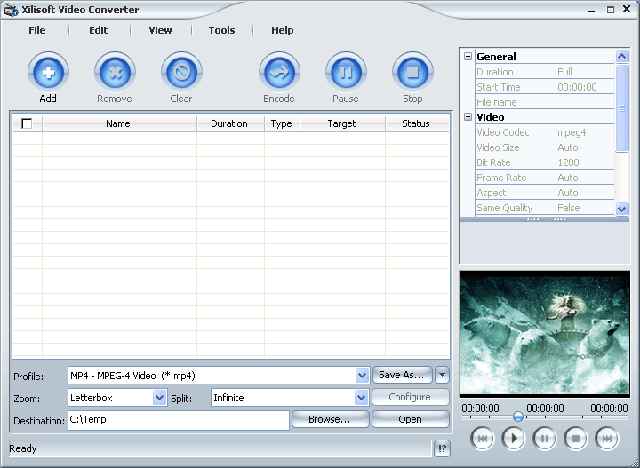
Support conversion of video files flv, swf DVD, VCD, SVCD, MOV, RM, AVI, MPEG, WMV, 3GP, H.264/MPEG-4 AVC, AVC H.264/PSP etc. ...
In addition, software is an easy way to convert video files into audio files including MP2 applications, MP3, AC3, RA, m4a file format, OGG, AAC etc. ... It also supports resolution code Ape, CUE and separating music from disk CD.
Video converter can also convert other formats to use for video iPod and PSP. You can select codec for video and audio, set the parameters of output. All conversion processes, such as from MPEG to AVI, WMV to MPEG, WMV to AVI, extremely easy and fast with high quality
4/6/09
Mobile Software, PC-Laptop Software
Technology more development but with the process is a series of problems arising due to a variety of file format multimedia. 5 tools to convert file format multimedia free following may help you resolve any problems related


1. Media Converter SA
Media Converter SA may be one of the tools to convert the best from before to now. Interface simple and easy enough to use any help anyone can use, but the Media Converter SA, with the ability to support a series of file format, users do not necessarily avoided unexpected. Does not appear to have any audio format, the image which can not be converted to the format common to Media Converter SA.
Besides functions convert most formats, Media Converter SA also includes many other options, enabling users to personalize the process. Of this: video solutions, start time, file storage maximum, bit rate, time recording etc ... Users can experience Media Converter SA online at http://www . mediaconverter.org /
Media Converter SA may be one of the tools to convert the best from before to now. Interface simple and easy enough to use any help anyone can use, but the Media Converter SA, with the ability to support a series of file format, users do not necessarily avoided unexpected. Does not appear to have any audio format, the image which can not be converted to the format common to Media Converter SA.
Besides functions convert most formats, Media Converter SA also includes many other options, enabling users to personalize the process. Of this: video solutions, start time, file storage maximum, bit rate, time recording etc ... Users can experience Media Converter SA online at http://www . mediaconverter.org /
More: convert audio, convert video, MediaCoder Video Convert Master 8.0.10.31 - switch Video format multifunction
McFunSoft Video Convert Master can record, convert, split and merge files: AVI, MPEG, MPEG 1, MPEG 2, MPEG 4, VCD, DVD, SVCD, rmvb, RM, WMV and any most of the video format to use. This is a software family to make requests for viewing movies at home or stored in PC. This software is compatible with the recording format DVD / VCD / SVCD. Easy to use, just 4 steps to the disk, convert, split or linked movie files.
Highlights:
* Conversion DẠNG ALL VIDEO
As AVI (Divx, Xvid, etc ...), MPEG 1.2 and 4, QuickTime, Real Video, WMV and DVD, SVCD, VCD.
* Burn DVD, VCD or SVCD
Create disk phime DVDs from video file format support to see the first DVD at home with friends and family.
* TRANSFER simple
Copied from the analog video camera and DV (digital video), VCRs, TV and Web cams.
Conducted to create your movie right time activities first.
* Bulk TREATMENT
Handling multiple files at once. Links and separating them. Delete the unwanted scene from your movie. Link multiple video files to a DVD.
* Access SUẤT images and sound
Stores the audio files to audio, extract the images that form and saved as image files.
The main features:
* Burn DVD movies to / VCD / SVCD;
* Convert AVI files, DVD, VCD, SVCD, MPEG, MPEG 1, MPEG 2, MPEG 4, RM, rmvb, WMV and other video formats;
* Conversion of the film series
* Browse previous movies during conversion
* Copy the device DV, WEB Camera, VCR, TV Tuner, and Analog Camera.
* Splits small files AVI, VCD, DVD or other video formats to many parts
* Links to files AVI, VCD, DVD or other video formats into a movie
* Can be customized video image size, audio / video bit rate, frame rate
* And much more!

Switch quickly:
* With the combination of DirectX 9.0 and the encoding conversion speed, you will not find any application which can convert video files faster Convert Master.
Create DVD, VCD and SVCD:
* Video Convert Master helps you to write the disk VCD / DVD / SVCD the formats AVI, WMV and other video formats. Also note how the disk VCD / DVD / SVCD is fully compatible even with PAL or NTSC system. Just drag the file to convert applications written to the disk you like and you can record disks VCD, DVD or SVCD.
Convert video series:
* You want to convert collections' Star Wars' as AVI to disk so you can see on DVD first? It takes quite a long time to convert a movie 20 hours and you do not want to sit there monitoring Video Convert Master gradually implement the conversion. So, you just need a set of AVI files that you want to convert, go to sleep, and the morning after you already have a DVD of the film.
Split and Combine small files:
* Burn Disc movie "lord of the rings" 'The Lord of Rings' generally takes more than 2 disks in VCD format. If you want to see movies with VCD disc, you can think of to separate the small keyboard. On the other hand, you want to combine 2 AVI movie format to 1, Video Convert Master provides you with solutions subdivide and combine files.
Input formats:
* AVI (Divx, Xvid, MS MPEG 4, Uncompressed, Cinepak and other formats)
* MPEG (MPEG 1, MPEG 2 Video, VCD, DVD, SVCD)
* WMV Windows Media Video
* Video format Quick Time for Apple Macintosh computer.
Output format:
* AVI (Divx, Xvid, MS MPEG 4, Uncompressed, Cinepak and other formats)
* MPEG (MPEG 1, MPEG 2 Video, VCD, DVD, SVCD)
* WMV Windows Media Video
* RM Real Networks Video
Name: vn-seo
Organization: www.vn-seo.com
Registration Key: VCM0982352
Highlights:
* Conversion DẠNG ALL VIDEO
As AVI (Divx, Xvid, etc ...), MPEG 1.2 and 4, QuickTime, Real Video, WMV and DVD, SVCD, VCD.
* Burn DVD, VCD or SVCD
Create disk phime DVDs from video file format support to see the first DVD at home with friends and family.
* TRANSFER simple
Copied from the analog video camera and DV (digital video), VCRs, TV and Web cams.
Conducted to create your movie right time activities first.
* Bulk TREATMENT
Handling multiple files at once. Links and separating them. Delete the unwanted scene from your movie. Link multiple video files to a DVD.
* Access SUẤT images and sound
Stores the audio files to audio, extract the images that form and saved as image files.
The main features:
* Burn DVD movies to / VCD / SVCD;
* Convert AVI files, DVD, VCD, SVCD, MPEG, MPEG 1, MPEG 2, MPEG 4, RM, rmvb, WMV and other video formats;
* Conversion of the film series
* Browse previous movies during conversion
* Copy the device DV, WEB Camera, VCR, TV Tuner, and Analog Camera.
* Splits small files AVI, VCD, DVD or other video formats to many parts
* Links to files AVI, VCD, DVD or other video formats into a movie
* Can be customized video image size, audio / video bit rate, frame rate
* And much more!
Switch quickly:
* With the combination of DirectX 9.0 and the encoding conversion speed, you will not find any application which can convert video files faster Convert Master.
Create DVD, VCD and SVCD:
* Video Convert Master helps you to write the disk VCD / DVD / SVCD the formats AVI, WMV and other video formats. Also note how the disk VCD / DVD / SVCD is fully compatible even with PAL or NTSC system. Just drag the file to convert applications written to the disk you like and you can record disks VCD, DVD or SVCD.
Convert video series:
* You want to convert collections' Star Wars' as AVI to disk so you can see on DVD first? It takes quite a long time to convert a movie 20 hours and you do not want to sit there monitoring Video Convert Master gradually implement the conversion. So, you just need a set of AVI files that you want to convert, go to sleep, and the morning after you already have a DVD of the film.
Split and Combine small files:
* Burn Disc movie "lord of the rings" 'The Lord of Rings' generally takes more than 2 disks in VCD format. If you want to see movies with VCD disc, you can think of to separate the small keyboard. On the other hand, you want to combine 2 AVI movie format to 1, Video Convert Master provides you with solutions subdivide and combine files.
Input formats:
* AVI (Divx, Xvid, MS MPEG 4, Uncompressed, Cinepak and other formats)
* MPEG (MPEG 1, MPEG 2 Video, VCD, DVD, SVCD)
* WMV Windows Media Video
* Video format Quick Time for Apple Macintosh computer.
Output format:
* AVI (Divx, Xvid, MS MPEG 4, Uncompressed, Cinepak and other formats)
* MPEG (MPEG 1, MPEG 2 Video, VCD, DVD, SVCD)
* WMV Windows Media Video
* RM Real Networks Video
Name: vn-seo
Organization: www.vn-seo.com
Registration Key: VCM0982352
Subscribe to:
Posts (Atom)
