4/7/09

Backup and restore data for Rim BlackBerry

Backup the information on your BlackBerry may have a little difference, however, its performance gives you is fantastic. Follow the instructions included in four steps, you will avoid the risks are not following this.


Anyone who has encountered situations lose all data on a computer or a handheld computer to understand the value of backup personal information, whether it is a collection of iTunes music files, photo albums list number or contact. Talking always easier to do, but for BlackBerry users to have a fortunate: The backup data celery and recovery process for smart phones Research In Motion (Rim) can not simply when you use the BlackBerry Desktop Manager software, this software is provided for all new equipment Rim.

Before this article, we have introduced some tips for saving battery for BlackBerry, but in this article, we will introduce you how to protect the data value on the machine by hand you using it to backup a computer hard drive - in the instructions, we will present how to automatically backup data from your device in the time booking.

To get started, all you need to do with the BlackBerry's download is the latest version of BlackBerry Desktop Software Manager, Microsoft Windows PC and USB cable to link mobile devices with your PC staff.

1. Download the latest version of BlackBerry Desktop Manager

First, you need to download the latest version of BlackBerry Desktop Software Manager, current version is released at this time is v4.5. To specify which version of Desktop Manager you're using, then launch the program through the Windows Start menu by click All Programs, and BlackBerry Desktop Manager. When the program is open, inhaling Help tab on the main screen, then choose About BlackBerry Desktop Manager. Version of the software will be listed in the General tab.

If you are not running Desktop Manager v4.5, visit the site and download Rim, install the latest version of this software.

2. Launch Desktop Manager, connect the BlackBerry with the computer

To, launch the software. Follow procedure above to open the program if you do not choose to create a shortcut icon on the desktop screen. When the program started, connect the BlackBerry device to your computer via USB cable. Close the dialog box that appears when the BlackBerry was connected, and this dialog box includes desktop manager to let you know that it is looking for upgraded applications.

Your BlackBerry then need to connect to the software and "Connected" should appear in the corners and on the left bottom of the screen desktop manager. If you still are not connected, try to plug the device and connect it to a different USB port.

3. Backup all or some data on your BlackBerry

Click the icon Backup and Restore the upper right hand corner of desktop manager screen. Screen below will give you three options: Backup, Restore and Advanced. To save all personal data in the memory of the BlackBerry, inhaled Back up the tab, select the name and location for the file and hit Save. BL process will take a few minutes, the screen will display the BlackBerry image in your handheld is connected to the computer during backup.

You also can set up BlackBerry Desktop Manager automatically backup data device in the set period of time ago (5 days, 7 days or 14 days, ...) whenever you start the program and connect devices handheld with your PC. To make so, you click Options tab below the Backup icon on the screen that appear after you fill the checkbox next to Back up my device data automatically every XX days. Then select the data that you want to backup. For example, you can choose to backup all data in the device or all data except the mail data is synchronized with another application. Once selected the information you want to copy, hit OK and then Back up the tab size on the screen.

To further customize the specific information you want to backup, enable the Advanced tab on the screen Backup and Restore. You will see a dialog box that displays the process of scanning the database of device applications, then a screen two columns: a column on the left named Computer Databases also named the other columns Device Databases. In the right column, select the data you want to backup and hit the arrow to the left two columns to keep the copy information from the Device Databases Computer Databases. When has all want to copy data, open the File menu - located directly on the column Computer Databases - choose a name for the backup file and save it to hard drive.

4. Restore data using the BlackBerry Desktop Manager Files

The recovery data for handheld devices using the desktop manager software and backup files created by applications completely simple. First, you need to find backup set file for easy search when you restore the data. To, applications launched BlackBerry Desktop Manager, click the icon in the Backup and Restore upper right hand corner and in the next screen, select Restore. Browse to the corresponding backup file on the hard drives and enable Open. Then you will be asked to confirm that you want to replace all data on existing equipment with the information in the file backup. Hit Yes, desktop applications manager will start the process of recovering your data. This process takes place a few minutes depending on the amount of information in the file.


Restore only partial data, such as contacts, or AutoText entries, completely similar to the above, but instead hit the screen in the Restore Backup and Restore and you click Advanced. Then open the File menu on the left - directly on the column Computer Databases - and open file backup are available. Select specific data you want to restore from file and click the arrow between two columns and Computer Databases Device Databases. When the dialog disappears is the time your data was restored

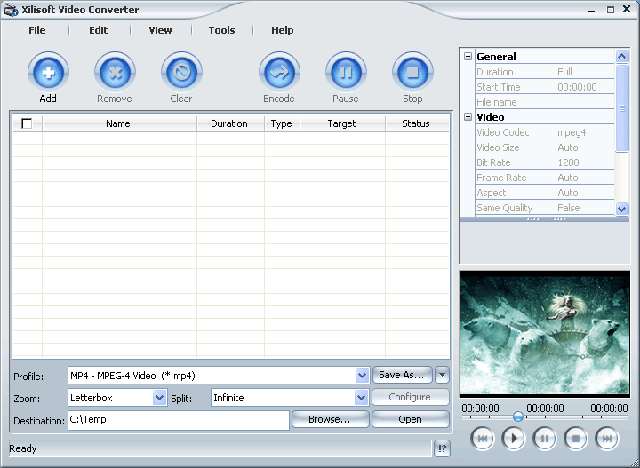
Xilisoft Video Converter:


Support conversion of video files flv, swf DVD, VCD, SVCD, MOV, RM, AVI, MPEG, WMV, 3GP, H.264/MPEG-4 AVC, AVC H.264/PSP etc. ...
In addition, software is an easy way to convert video files into audio files including MP2 applications, MP3, AC3, RA, m4a file format, OGG, AAC etc. ... It also supports resolution code Ape, CUE and separating music from disk CD.
Video converter can also convert other formats to use for video iPod and PSP. You can select codec for video and audio, set the parameters of output. All conversion processes, such as from MPEG to AVI, WMV to MPEG, WMV to AVI, extremely easy and fast with high quality

4/6/09

Mobile Software, PC-Laptop Software

Technology more development but with the process is a series of problems arising due to a variety of file format multimedia. 5 tools to convert file format multimedia free following may help you resolve any problems related


1. Media Converter SA

Media Converter SA may be one of the tools to convert the best from before to now. Interface simple and easy enough to use any help anyone can use, but the Media Converter SA, with the ability to support a series of file format, users do not necessarily avoided unexpected. Does not appear to have any audio format, the image which can not be converted to the format common to Media Converter SA.

Besides functions convert most formats, Media Converter SA also includes many other options, enabling users to personalize the process. Of this: video solutions, start time, file storage maximum, bit rate, time recording etc ... Users can experience Media Converter SA online at http://www . mediaconverter.org /

More: convert audio, convert video, MediaCoder Video Convert Master 8.0.10.31 - switch Video format multifunction

McFunSoft Video Convert Master can record, convert, split and merge files: AVI, MPEG, MPEG 1, MPEG 2, MPEG 4, VCD, DVD, SVCD, rmvb, RM, WMV and any most of the video format to use. This is a software family to make requests for viewing movies at home or stored in PC. This software is compatible with the recording format DVD / VCD / SVCD. Easy to use, just 4 steps to the disk, convert, split or linked movie files.

Highlights:

* Conversion DẠNG ALL VIDEO
As AVI (Divx, Xvid, etc ...), MPEG 1.2 and 4, QuickTime, Real Video, WMV and DVD, SVCD, VCD.
* Burn DVD, VCD or SVCD
Create disk phime DVDs from video file format support to see the first DVD at home with friends and family.
* TRANSFER simple
Copied from the analog video camera and DV (digital video), VCRs, TV and Web cams.
Conducted to create your movie right time activities first.
* Bulk TREATMENT
Handling multiple files at once. Links and separating them. Delete the unwanted scene from your movie. Link multiple video files to a DVD.
* Access SUẤT images and sound
Stores the audio files to audio, extract the images that form and saved as image files.

The main features:

* Burn DVD movies to / VCD / SVCD;
* Convert AVI files, DVD, VCD, SVCD, MPEG, MPEG 1, MPEG 2, MPEG 4, RM, rmvb, WMV and other video formats;
* Conversion of the film series
* Browse previous movies during conversion
* Copy the device DV, WEB Camera, VCR, TV Tuner, and Analog Camera.
* Splits small files AVI, VCD, DVD or other video formats to many parts
* Links to files AVI, VCD, DVD or other video formats into a movie
* Can be customized video image size, audio / video bit rate, frame rate
* And much more!


Switch quickly:

* With the combination of DirectX 9.0 and the encoding conversion speed, you will not find any application which can convert video files faster Convert Master.

Create DVD, VCD and SVCD:

* Video Convert Master helps you to write the disk VCD / DVD / SVCD the formats AVI, WMV and other video formats. Also note how the disk VCD / DVD / SVCD is fully compatible even with PAL or NTSC system. Just drag the file to convert applications written to the disk you like and you can record disks VCD, DVD or SVCD.

Convert video series:

* You want to convert collections' Star Wars' as AVI to disk so you can see on DVD first? It takes quite a long time to convert a movie 20 hours and you do not want to sit there monitoring Video Convert Master gradually implement the conversion. So, you just need a set of AVI files that you want to convert, go to sleep, and the morning after you already have a DVD of the film.

Split and Combine small files:

* Burn Disc movie "lord of the rings" 'The Lord of Rings' generally takes more than 2 disks in VCD format. If you want to see movies with VCD disc, you can think of to separate the small keyboard. On the other hand, you want to combine 2 AVI movie format to 1, Video Convert Master provides you with solutions subdivide and combine files.

Input formats:

* AVI (Divx, Xvid, MS MPEG 4, Uncompressed, Cinepak and other formats)
* MPEG (MPEG 1, MPEG 2 Video, VCD, DVD, SVCD)
* WMV Windows Media Video
* Video format Quick Time for Apple Macintosh computer.

Output format:

* AVI (Divx, Xvid, MS MPEG 4, Uncompressed, Cinepak and other formats)
* MPEG (MPEG 1, MPEG 2 Video, VCD, DVD, SVCD)
* WMV Windows Media Video
* RM Real Networks Video


Name: vn-seo
Organization: www.vn-seo.com
Registration Key: VCM0982352

3/29/09

Mobiledit

Utilities allow connection to control PC from mobile phone via Bluetooth, infrared or cable; model supports many Nokia, Siemens, Samsung, Motorola, Sony Ericsson ... With this gadget you can easily copy files or download from Mobile Phones up ringtone, logo preferred. You may also make phone calls, receive calls, send SMS, play games, managing phone directory and many other functions.


This software is Shareware Compelson led Lab (http://www.compelson.com/), free for use 7 days with full features. Download in http://www.mobiledit.com/downloads.asp.

Kaspersky Antivirus Mobile

Kaspersky Lab has issued the anti-virus software for cell phone line Smart Phones.

Product called Kaspersky Anti-Virus Mobile, can stop all the programs at risk of damage before they get on the phone and can scan the entire equipment for the software and read.

Product is based on Kaspersky every five companies of the enhanced security product for mobile phones. Currently, this product has not been welcomed by the manufacturers do lest the price of products will rise, while safety and reliability is not much.

This software is necessary to be able to download a normally from Kaspersky Lab's servers through protocols such as WAP and HTTP.

Ultra Mp3

Ultra Mp3 player is the music for mobile phones. As an application interface with nice graphics, it allows users to play popular music on "dế by themselves. Ultra Mp3 download and play music in a format mp3.
.


Ultra Mp3 also has many beautiful skin, you can download the skin from the homepage.